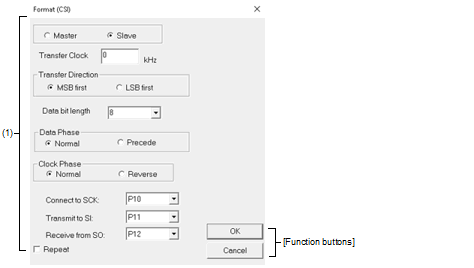
This dialog box is used to specify the serial format for the 3-wire serial interface (CSI).
This section describes the following.
On the Serial window with the CSI serial interface, any one of the following:
|
Operates this window as a master. Setting of [Transfer Clock] is required for generating the clock during communication. |
||
|
Operates this window as a slave (default). Communication is performed using the clock of the serial interface provided in the CPU. |
||
|
Directly input the transfer clock value (unit: kHz). Values with decimals can also be set. This item must be set when master is selected. |
||
|
Select the bit length of the transmission data from the drop-down list, or specify it through direct input (default: 8). |
||
|
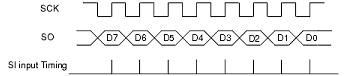
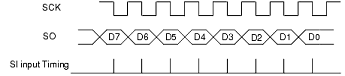
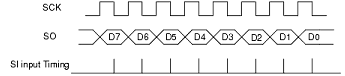
Select the transmission/reception timing to set the data phase. The data clock phase is set in combination with "Clock Phase" as shown in "Table A.15 Data Clock Phase Settings". |
||
|
Transmits/receives data at the normal 3-wire serial transmission/reception timing (default). |
||
|
Transmits/receives data at a timing half a clock of the operation clock earlier than the normal 3-wire serial transmission/reception timing. |
||
|
Select the transmission/reception clock waveform to set the clock phase. The data clock phase is set in combination with "Data Phase" as shown in "Table A.15 Data Clock Phase Settings". |
||
|
Operates on the reverse clock of the normal 3-wire serial clock. Transfer starts at the rising edge of the clock. |
||
|
Select the pin for use in the input and output of a serial clock to the microcontroller from the drop-down list.Note |
||
|
Select the pin for use in the input of serial data to the microcontroller from the drop-down list.Note |
||
|
Select the pin for use in the output of serial data on the microcontroller from the drop-down list.Note |
||
|
Select this item to repeat data transfer when the [Auto Send] button in the Serial window has been clicked. |
||
|
Following transmission of the last data during automatic transmission, returns to the beginning of the data and performs automatic transmission. |
||
|
Following transmission of the last data during automatic transmission, stops transmission. |
||


When the port pin to which a multiplexed pin function is assigned in the peripheral I/O redirection register is to be changed, select the pin in accord with the settings. If the selected pin does not correspond to the settings of the peripheral I/O redirection register, data will not be correctly sent and received in the Serial window. |
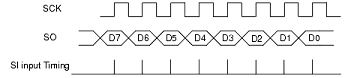
[Transmission/reception when 3-wire serial interface (CSI) is selected]
When a CSI serial interface is selected, operation of the Serial window is as follows.
|
Data is transmitted or received immediately after clicking the [Send] button or the [Auto Send] button in the Serial editor area. |
|
|
Data becomes ready to be transmitted after clicking the [Send] button or the [Auto Send] button in the Serial editor area. Data starts to be transmitted when the CSI clock signal is received in the data transmission ready status. This ready status is released when data transmission is completed. (Even if the CSI clock is received, data is not transmitted in other than the data transmission ready status.) Data is directly received without the need to click on a button. |